Why a "Canada" setting is not enough
The best-known cookie plugins on WordPress were built around European and US rules. When a setup wizard asks for your region, picking "Canada" feels like the right answer. Check what that choice actually does: if the banner lets tracking start and only offers a way to opt out afterwards, it does not fit Quebec.
Section 8.1 of Quebec's Act respecting the protection of personal information in the private sector says that anyone collecting personal information "using technology that includes functions allowing the person concerned to be identified, located or profiled must first inform the person" of that technology and "of the means available to activate" those functions. The Commission d'accès à l'information (CAI), Quebec's privacy regulator, reads it plainly: these technologies "ne pourront être activées par défaut" (they cannot be switched on by default), and it is up to the person to turn them on (CAI).
One caveat worth knowing. The Act never uses the word "cookie" in section 8.1, and section 9.1, the privacy-by-default rule, expressly "does not apply to privacy settings for browser cookies". The mainstream reading, which this guide follows, is that strictly necessary cookies can run, while anything that measures or tracks the visitor waits for a yes. Other provinces can be handled differently: CookieChimp notes that Quebec can get an opt-in banner "while the rest of Canada receives the appropriate opt-out experience" if your tool detects the province (CookieChimp).
For the broader Law 25 checklist (incident register, vendors outside Quebec, penalties), see my Loi 25 website checklist (in French). This page stays inside the WordPress dashboard.
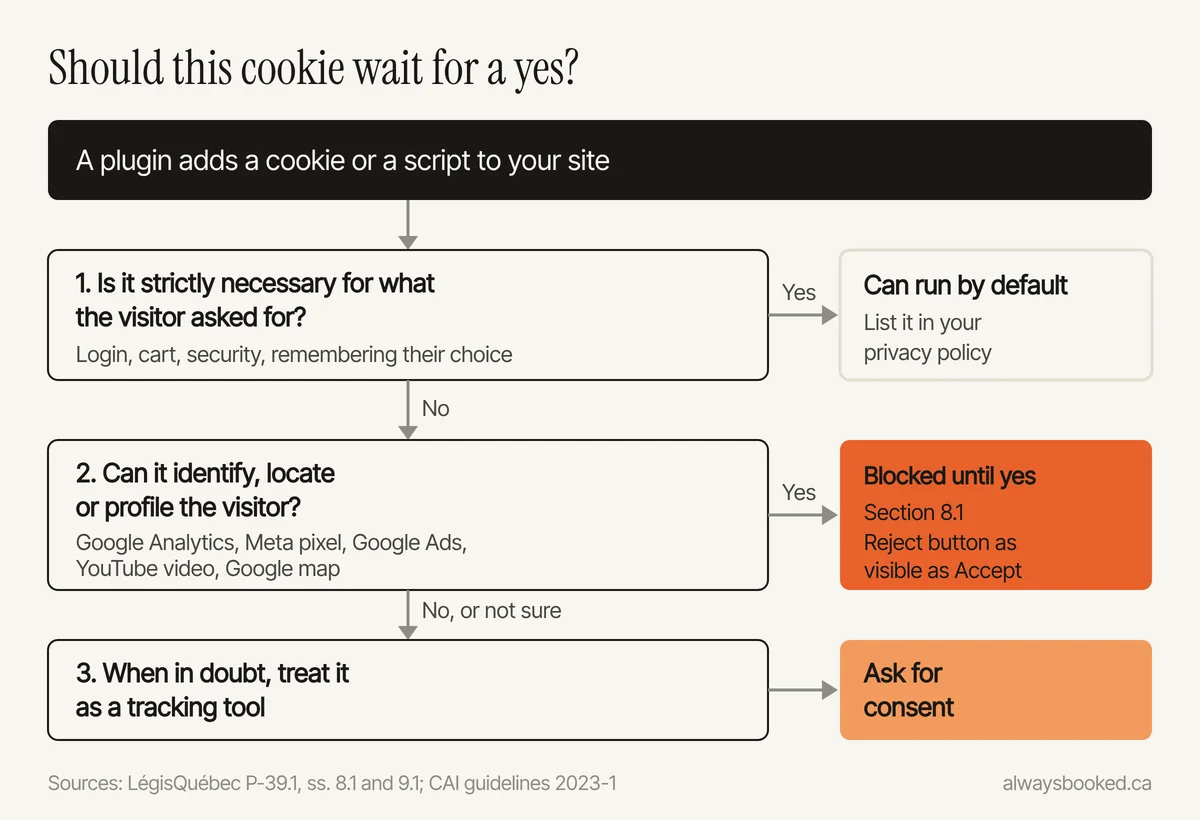
Which plugins on your site set cookies
Go to Plugins, then Installed Plugins, and match your list against this table. These are the usual suspects on a small business site.
| What you have | What it sets or sends | Waits for consent? | What to do |
|---|---|---|---|
| Google Analytics (Site Kit, MonsterInsights, Tag Manager or pasted code) | _ga cookie, kept 2 years by default |
Yes | Blocked by the consent plugin, or basic consent mode |
| Meta pixel (PixelYourSite or pasted code) | _fbp cookie and hits to Facebook |
Yes | Blocked, or fbq('consent', 'revoke') before init (Meta) |
| Google Ads conversion tag | Google advertising cookies | Yes | Same rule as Analytics |
| Contact or quote form (Contact Form 7, WPForms, Gravity Forms) | What the visitor types | No, the visitor hands it over | A notice under the submit button (s. 8) |
| Google reCAPTCHA on the form | Google script | Treat as a third-party tool | List it in the policy; consider spam protection without a third-party script |
| Embedded YouTube video | YouTube script and cookies | Yes | Use youtube-nocookie.com (privacy-enhanced mode) and block until consent |
| Embedded Google map | Google script | Yes | A static image with a "Show map" button |
| WordPress comments | Three comment_author cookies, kept just under a year |
Set after someone comments | Turn comments off if you do not use them |
| Admin login | WordPress session cookies | No, required | Nothing |
About Site Kit, Google's own plugin: its FAQ on WordPress.org says site owners "are responsible for managing notice and consent requirements". Installing it does not handle consent for you; pair it with a consent plugin.
Pick a consent plugin and change six settings
Here is what the main options look like, from WordPress.org and each vendor's pricing page as checked in October 2026.
| Plugin | Active installs | Free version | Paid version |
|---|---|---|---|
| CookieYes | 1,000,000+ | 5,000 page views a month, one banner language | US$10 a month (Basic, multilingual banner); geo-targeting by region from Pro, US$25 a month |
| Complianz | 1,000,000+ | Banner, cookie scan, script blocking | US$59 a year for one site |
| Cookie Compliance (formerly Cookie Notice) | 800,000+ | 1,000 visits a month in connected mode | Depends on plan |
Whichever you choose, change these six settings:
- Opt-in model. Nothing non-essential loads before the visitor chooses. CookieYes's own Law 25 documentation tells you to pick the "GDPR" consent template. Avoid templates labelled "CCPA" or generic Canada, which are often opt-out.
- A Reject button as visible as Accept. The CAI's consent guidelines say (our translation) that giving consent "should be as easy as not giving it", and that highlighting acceptance through colour, font size or extra clicks can make the consent invalid.
- French and English. On a bilingual site the banner follows the page language, French first. This is exactly what CookieYes's free plan leaves out.
- Automatic script and iframe blocking. Turn it on, then confirm that Analytics, the pixel, YouTube and the map each sit in a blocked category.
- Google consent mode set to basic. In basic mode, Google tags do not load until the visitor answers. In advanced mode, Google says the system "defaults to a consented state unless a specific choice has been made", with regional exceptions for Europe (Google Ads Help). If you use advanced mode, set every default to
deniedyourself, as in Google's example. - A way to change one's mind. Add a "Cookie settings" link in the footer so visitors can withdraw consent at any time.
Your privacy policy inside WordPress
Under Settings, then Privacy, WordPress lets you pick the policy page and offers a suggested template. WordPress is clear that it is "your responsibility" to complete it and keep it current (WordPress). The template is written for a generic blog. It knows nothing about Quebec or your tools.
The CAI's privacy policy guide lists what the policy should cover. Applied to a small business WordPress site:
- business name, effective date and last update;
- how you collect information: contact or quote form, online booking, email, cookies;
- what you collect (name, phone, email, IP address, pages viewed) and why;
- who receives it (Google, Meta, your booking tool, your host), and whether it may leave Quebec;
- which technologies identify or profile, that they are off by default, and how to turn them on;
- the rights of access, correction and complaint, and how to use them;
- the title and contact details of the person in charge of privacy.
For an access request, Tools, then Export Personal Data, gathers what WordPress and participating plugins hold about someone. WordPress warns that you "may need to go beyond" that tool (WordPress): think of your inbox and your booking software.
Where to show the person in charge and your notices
Person in charge. Section 3.1 makes the person with the highest authority in the business the person in charge of privacy by default, and requires their "title and contact information" to be published on the website. A name is not required by that text. Put one line in the footer (Appearance, then Widgets, or Appearance, then Editor on a block theme) and repeat it in the policy: "Person in charge of the protection of personal information: [title], [email]". Use an inbox someone actually reads.
A notice under every form. Section 8 requires telling people, at the time of collection, why you collect and how. One sentence under the submit button, linked to the policy, does it: "We use this information to answer your request and prepare your quote. See our privacy policy."
Newsletter on its own. If the form also signs people up for emails, use a separate unticked box. Section 14 says a written consent request "must be presented separately from any other information".
The 15-minute browser test
A banner can look perfect while Google Analytics fires behind it. The only way to know is to look. In Chrome, Edge or Firefox:
- Open your site in a private window. Do not touch the banner.
- Open developer tools (F12, or right-click, then Inspect). Under Application, then Cookies (Storage in Firefox), you should see no
_gaand no_fbp. - In the Network tab, reload and type
collectin the filter, thenfacebook. Nothing should appear. - Click Reject all and reload. Still nothing.
- Clear cookies, reload, click Accept all. Now
_gaand_fbpshow up, which proves the banner actually controls the tools. - Repeat on a French page, a page with a video, and on your phone.
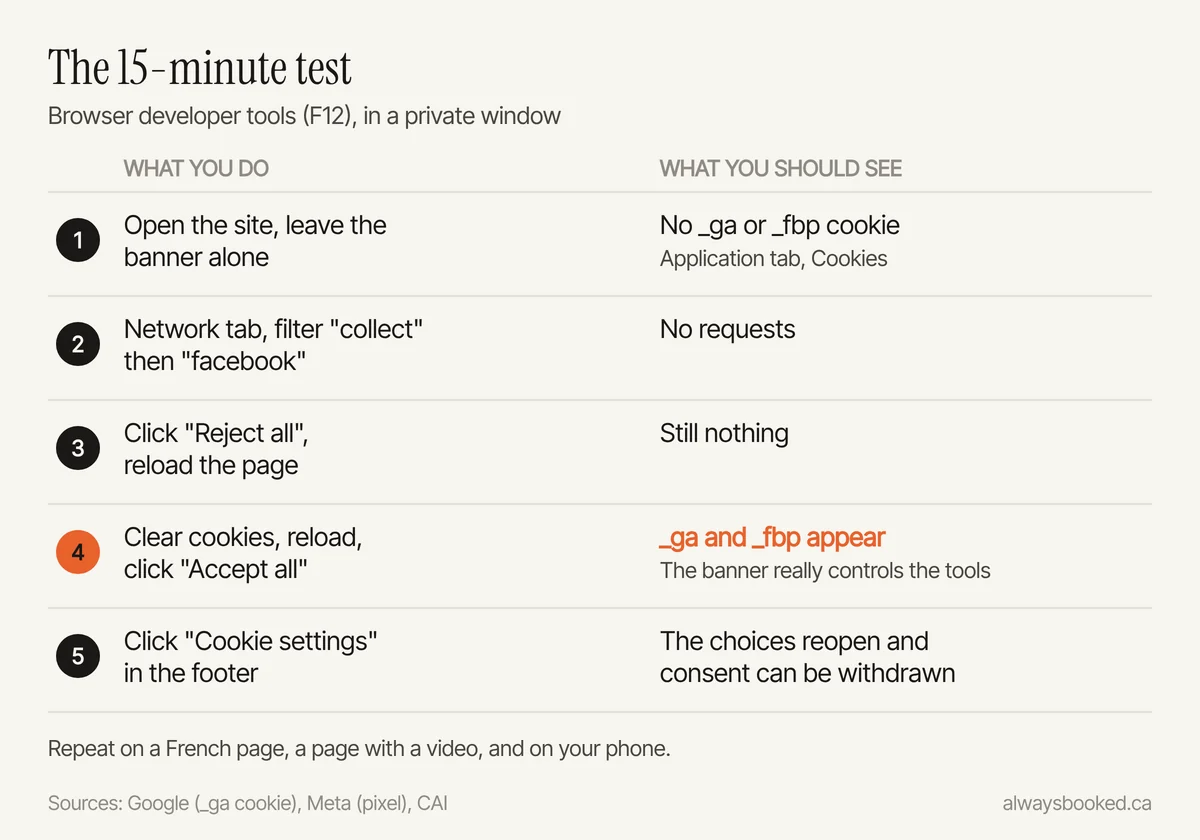
If _ga appears before you click anything, Analytics is probably loaded twice, for example by Site Kit and by code pasted into the theme. Remove one source and test again.
How Always Booked handles this
Every Always Booked website, at $1,500, includes quote forms or online booking with an instant alert for each new lead, and copy written in French and English. We go through this checklist when we plan the site. As the person in charge, you still sign off on the privacy policy, since it commits your business. If you are budgeting, my guide to website costs in Quebec puts the numbers side by side. With the care plan at $150 a month, security updates are handled and I check every month that booking and forms still work.
This article is general information about Law 25, not legal advice; for your situation, speak with a lawyer.
Questions
Do I need a cookie banner if my visitors are mostly outside Quebec?
If your business operates in Quebec, the Quebec act generally applies to the personal information you collect, wherever the visitor is. Some plugins can show an opt-in banner to Quebec visitors only, but on CookieYes that geo-targeting is a paid Pro feature. For a local business, one opt-in banner for everyone is simpler.
Is Google Analytics allowed under Law 25?
Yes, once the visitor agrees. With Google's basic consent mode, Google says no data is sent before the visitor interacts with the banner and, if they decline, not even the consent status.
My WordPress theme came with a privacy policy. Is that enough?
No. WordPress's own documentation says the suggested text is a starting point and that keeping the policy complete and accurate is your responsibility. It does not mention Law 25, your booking tool or your ad pixels.
Does my banner have to be in French?
If your site has a French version, and in Quebec it generally must, the banner and the privacy policy need to follow the page language, starting with French. CookieYes's free plan, for one, offers a single banner language.
Want this done for you?
Websites: $1,500. A 15-minute call to see if it is a good fit.
Sources
- Act respecting the protection of personal information in the private sector, CQLR c. P-39.1 (LégisQuébec)
- CAI: Main changes introduced by Law 25 (French)
- CAI: Guidelines 2023-1, Consent: validity criteria (French)
- CAI: Writing a privacy policy, guide for businesses (French)
- Google Analytics Help: [GA4] Cookie usage on websites
- Google Ads Help: About consent mode (basic and advanced)
- Google: Set up consent mode on websites
- Meta: Meta Pixel and consent (fbq consent)
- YouTube Help: Privacy-enhanced mode for embedded videos
- WordPress: Cookies
- WordPress: Settings, Privacy screen
- WordPress: Tools, Export Personal Data screen
- WordPress.org: Site Kit by Google (FAQ)
- WordPress.org: CookieYes
- WordPress.org: Complianz
- WordPress.org: Cookie Compliance for WordPress
- CookieYes: pricing
- CookieYes: Quebec's Privacy Act, Law 25 (documentation)
- Complianz: pricing
- CookieChimp: Can cookie banners target Canadian provinces?